
How to Change the Font in a PDF Text Box: Added Text, Form Fields and the PDF’s Own Words
Every thread about a PDF text box font ends the same way: there is no font option, and then someone asks which kind of box it is.
Every thread about a PDF text box font ends the same way: there’s no font option,
and then a reply asking which kind of box it is.
I spent an afternoon with Apple’s Preview guide, an Adobe community thread on form fonts and our own editor’s Add Text tool, to sort the answer by box type.
The split that matters: a box you added, a form field and the PDF’s original words each need a different tool.
Short answer: To change the font in a PDF text box, first find out which kind it is. A box you added: in Mac Preview use Text Style in the Markup toolbar, in Acrobat use Edit PDF. A form field: Acrobat’s Prepare Form, then Properties, Appearance, Font. Our free editor only changes size.
- Added box, Mac
- Preview, Markup toolbar, Text Style.
- Form field
- Acrobat Prepare Form, Properties, Appearance tab.
- Free, size only
- PDF Edit Add Text, Font size box.
- Original PDF words
- The font must be installed, or retype the whole line.
Which kind of PDF text box do you have?
Click the box. If it has a frame and a click puts a cursor inside it, it is a form field. If you or an app drew it on top of the page, it is an added box. If you cannot click it at all, it is the PDF’s own text.
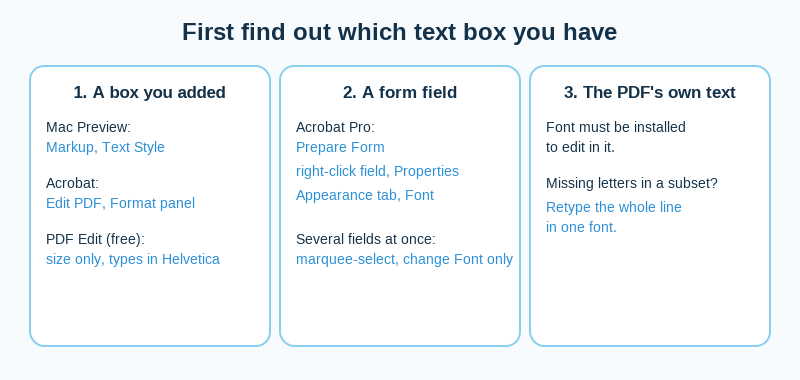
| Box type | How to spot it | Where the font is changed |
|---|---|---|
| Added text box | Drawn on top by you or an app | The app’s text or format controls |
| Form field | Frame, cursor appears on click | Field Properties, Appearance tab, in Acrobat |
| The PDF’s own text | Not clickable in a viewer | An editor with text editing; the font must be installed |
In short: added box, change it where you added it; form field, change it in Acrobat Pro; original text, install the font or retype.
How do you change the font in a text box you added?
Select the box, then use the app’s font control. On a Mac, Apple’s Preview guide says the Text Style tool in the Markup toolbar will Change the font or the font style and color.
- Open the PDF in Preview and show the Markup toolbar.
- Click the text box you added so its frame shows.
- Click Text Style and pick the font, style and colour.
Apple’s page does not describe a size control, so check the same Text Style panel for it. In Acrobat, the Edit PDF tool shows font and size options for a selected box; Adobe’s help page would not load for us, so we have not quoted it.
How do you change the font in a fillable form field?
In Acrobat Pro: Tools, Prepare Form, right-click the field, choose Properties, open the Appearance tab and pick a Font. Several guides say you can marquee-select many fields and change only the font to restyle them together.
- Font size does nothing? Guides say
Auto
size scales text to fit the box. Set a fixed size instead. - Whole form at once: a 2021 poster in the Adobe community thread shared a console script that loops through all text fields and sets textFont.
- Reader users: a search-result summary says Adobe Reader does not let you change a field’s font; that is usually Acrobat Pro.
Can you change the font in PDF Edit for free?
You can change the size, not the font. PDF Edit’s Add Text tool has a Font size box (6 to 72, default 12) and writes the text in Helvetica. Open the free editor, pick Add Text, set the size, click the page and type.
Need a different font? Add the text in the free editor only when Helvetica is fine, or use Preview’s Text Style or Acrobat for a full font list. We would rather say that than promise a font menu we do not have.
Why does retyped text in the PDF’s own words change font?
A PDF often stores only the letters it already shows, so a new letter has no font to come from. Our guide to editing PDF text without Adobe shows a test file that holds 26 of Georgia’s characters.
Honestly, learning that a form field keeps its font in Properties instead of the toolbar made the missing-menu mystery click for me.
Fix it by installing the font, or retype the whole word or line in one font. Our remove and add text guide covers covering and retyping.
Which app changes the font in a PDF text box?
Preview and Acrobat Pro change fonts; PDF Edit changes size only. Checked November 28, 2026.
| App | Added text box | Form field | Source |
|---|---|---|---|
| PDF Edit (free) | Size only, Helvetica | Not a form tool for fonts | Our editor |
| Mac Preview | Font, style, colour via Text Style | Not described | Apple |
| Acrobat Pro | Edit PDF font options | Properties, Appearance, Font | Adobe community |
| Adobe Reader | Not covered here | Reported not possible | Search summary, not Adobe |
Where does the form-field advice differ?
- Where to set it: the thread says Acrobat, one field at a time or by marquee; others say InDesign, now that newer versions let you enter a font for form fields.
- Reader: a search summary says Reader cannot do it; no Adobe page we could read confirms or denies that.
- Fonts that travel: one reply says use system fonts, since embedded or uncommon fonts may not display on another machine.
How we researched this
- Read Apple’s Preview User Guide page on annotating a PDF and an Adobe community thread on form field fonts, November 28, 2026.
- Read search-result summaries of Acrobat’s Properties, Appearance steps, November 28, 2026. Adobe’s own help page returned an error to our reader, so we quote none of it.
- Checked our editor’s Add Text tool: a Font size box and Helvetica text.
- We did not run Acrobat or Preview ourselves and did not test every PDF.
Find your box type, pick the font where it lives, and enjoy text that looks the way you meant.
Sources and further reading
Questions and answers
How do I change the font in a PDF text box?
Find out which box it is. For a box you added, use the app’s font control, such as Text Style in Mac Preview’s Markup toolbar. For a form field, use Properties, Appearance in Acrobat Pro.
Can I change the font in a PDF for free?
Yes, on a Mac with Preview’s Text Style. PDF Edit is free too, but it changes only the size and types in Helvetica.
Why can’t I change the font in a PDF form field?
Adobe Reader is reported not to allow it, and an Auto font size can hide size changes. Use Acrobat Pro: Prepare Form, Properties, Appearance.
Why does my edited PDF text come out in a different font?
A PDF often stores only the letters it shows, so new letters need another font. Install the original font or retype the whole line.
How do I change the font size in PDF Edit?
Pick Add Text, set the Font size box between 6 and 72, click the page and type.