
How to Remove Text from a PDF Online for Free: Cover It, Delete It or Remove It for Good
Every guide to removing text from a PDF online promises one click, and then the words are still there when someone presses Select All.
Every guide to removing text from a PDF online promises one click, and then the words are still there when someone presses Select All.
I spent an afternoon reading Adobe’s help pages on editing and redacting and the pages of four free online text removers, then ran the same job through our own whiteout and flatten tools.
Adobe separates three jobs: deleting text, redacting it, and sanitizing the file. Most free sites mention only the first.
Short answer: To remove text from a PDF online for free, open the file in a browser editor, cover the words with a whiteout box, and save a copy. If the words are private, flatten the pages too, so the text is turned into a picture and cannot be copied. A scanned PDF needs this cover method, because there is no real text to delete.
- Quickest
- Whiteout Box in PDF Edit, then Save as new PDF.
- For private words
- Cover, then Flatten pages.
- Real text, rewriting
- An editor with text deletion, such as Acrobat’s Edit mode.
- Cost
- $0, no sign-up, nothing uploaded in PDF Edit.
How do you remove text from a PDF: cover it, delete it or flatten it?
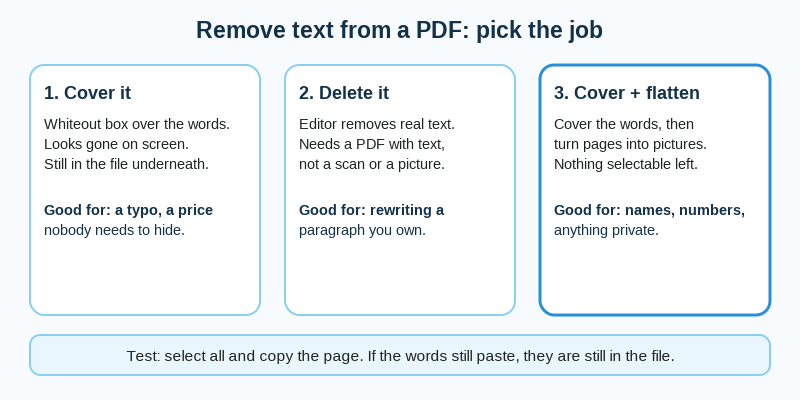
Three jobs hide behind the same phrase: cover the words so they look gone, delete real text from the file, or flatten the page so nothing can be copied. Pick by what happens if someone selects the page.
| Method | Works on a scan | Words still in the file | Free online |
|---|---|---|---|
| Whiteout box | Yes | Yes, under the box | Yes (PDF Edit) |
| Whiteout box + Flatten | Yes | No, the page becomes a picture | Yes (PDF Edit) |
| Delete in a text editor | No, needs real text | Gone from the text layer | Often, with limits |
| Acrobat Pro Redact | Yes | No, per Adobe | No, paid |
In short: a whiteout box only hides; flattening is what removes.
How do you remove text from a PDF online for free without uploading it?
Open pdfedit.xyz/editor, load the PDF, draw a Whiteout Box over the words, then tick Flatten pages and press Save as new PDF. The file is processed in your browser; nothing is uploaded.
- Load the PDF from your computer or phone.
- Pick Whiteout Box and drag it over the text, a little bigger than the words.
- Check the page. Add new words with Add Text if the line should say something else.
- Flatten pages if anything private sat under the box.
- Save as new PDF and keep the original untouched.
Here’s the catch: flattening turns the page into a picture, so you lose copy and search on that page. That is the point for private text, and a cost for a long contract you still need to search.
How do you remove text from a scanned PDF?
Cover it. A scan is a photo of paper, so no text exists to select or delete; a whiteout box over the words, then a flatten, is the whole job. Tools that offer Delete on a scan usually run OCR first and guess.
- Not selectable? Drag across the line. If nothing highlights, the page is a picture.
- Background not white? A white box shows on tinted paper; our guide to editing scanned PDF text covers matching it.
- Then retype the new words with Add Text if the line needs replacing.
How do you remove text from a PDF permanently?
Cover it and flatten it, or use true redaction. A box drawn over text does not delete what is underneath, so someone can still select, copy or search the words. Check by pressing Select All and copying the page into a notes app.
- Free: Whiteout Box, then Flatten pages in PDF Edit.
- Paid: Acrobat Pro’s Redact tool; Adobe says to choose Redact text and images, drag over the content, then select Apply.
- Also check: comments, hidden layers and file details can carry words too. Adobe’s Sanitize PDFs page exists for exactly that.
What do free online PDF text removers actually do?
Sites such as Sejda, PDFgear, AvePDF and HiPDF let you select text in a PDF and delete it, usually after you upload the file. They work best on PDFs with real text and say little about scans or leftover hidden data.
Honestly, learning that a white box only hides words and never deletes them made the Select All test my favorite ten-second check.
| Tool | How it removes text | What its page says |
|---|---|---|
| PDFgear | Select and delete in its editor | No subscription or account |
| AvePDF | Highlight, then delete | Free, no sign-up |
| HiPDF | Upload, select, delete | Upload step |
| Sejda (per SoftPicker) | Edit PDF, select, delete | Fast on native PDFs |
If a file holds private text, check where each tool says it processes the file before you upload it.
How does Adobe Acrobat remove text from a PDF?
In Acrobat, choose Edit, then Text under Add Content, select the words and press Delete (macOS) or Backspace (Windows). Adobe’s page adds that a font must be installed to edit text in it.
Editing is not a secure wipe; Redact in Acrobat Pro is the tool Adobe offers for that. Our guide to editing PDF text without Adobe explains why fonts block edits.
Why can’t I delete text in my PDF?
Usually the page is a scan, the editor only adds text, or the file is locked. Work through these in order.
- Is it a scan? Try selecting a line. No highlight means cover it instead.
- Is the editor a viewer? Chrome, Preview and Reader add text; none of them deletes existing words.
- Is the font missing? Adobe says an embedded font that isn’t installed limits you to color and size changes.
- Is it password locked? Locked files may refuse changes.
- Use a whiteout box. It works on any page.
Where do guides on removing PDF text disagree?
Delete text and it’s gone.
One third-party guide I read says to delete in Edit mode and then flatten for guaranteed removal; Adobe’s own edit page doesn’t promise secure removal.- “White it out.” Adobe’s own guide to white-out shows it as a way to hide content, which is not removal.
Online tools are free.
Smallpdf’s free plan is limited, per SoftPicker, to 2 tasks a day with a 5 MB file limit.
How we researched this
- Read Adobe’s help pages on editing text in PDFs, redacting in Acrobat Pro, and sanitizing, November 28, 2026.
- Read the pages of PDFgear, AvePDF, HiPDF and a SoftPicker roundup on free text removers, November 28, 2026.
- A search for Reddit threads on this question returned no Reddit pages, so no forum posts are quoted.
- Checked the PDF Edit editor’s Whiteout Box and Flatten pages tools. We did not run the other online tools ourselves, and we did not test every PDF.
Cover it, flatten it, copy the page to check, and enjoy sending a PDF with nothing left behind.
Sources and further reading
Questions and answers
How do I remove text from a PDF online for free?
Open a free browser editor such as PDF Edit, cover the words with a whiteout box and save a copy. Add Flatten pages if the words are private. No sign-up is needed, and nothing is uploaded.
Can I delete text from a PDF for free?
Yes. Whiteout in PDF Edit is free and works on any PDF. Several online sites also delete real text for free, though they may need an upload and often limit file size or daily tasks.
How do I permanently remove text from a PDF?
Cover it and flatten the pages, or use Acrobat Pro’s Redact tool. A box alone only hides the words. Press Select All on the saved copy to check that nothing pastes.
How do I remove text from a scanned PDF?
Cover it with a whiteout box, because a scan is a picture with no real text to delete. Add new words on top with Add Text if the line needs replacing.
Why can’t I select or delete text in my PDF?
The page is probably a scan, the app only adds text, or the file is locked. A whiteout box works in each of those cases.