
How to Add Page Numbers to a PDF Online: Free Steps, Cover Pages and Reordering
Every guide to adding page numbers to a PDF online lists four steps, and few warn you that the numbers do not follow a page that moves.
Every add page numbers to a PDF online
result I opened lists the same four steps, and almost none say what happens to the numbers when a page moves.
I spent an afternoon with Adobe’s page-number tool page, iLovePDF’s guide and PDF Candy’s no-Acrobat roundup, then lined up what each one asks of you.
The steps are short. The order you do them in is what saves a redo.
Short answer: To add page numbers to a PDF online, open the finished PDF in an online page-number tool, choose where the numbers sit and which pages get them, apply, then download the new file and check the first and last page. Do it after any page is added, deleted or moved. The free PDF Edit editor adds page numbers with no sign-up.
- Steps
- Open the PDF, add page numbers, download, check.
- Do it last
- Numbers do not update if pages move afterwards.
- Free online
- PDF Edit: page numbers, no sign-up.
How do you add page numbers to a PDF online?
You add page numbers online by opening the PDF in a page-number tool, setting the position and page range, applying, and downloading a new copy. Adobe, iLovePDF and PDF Candy all follow this shape.
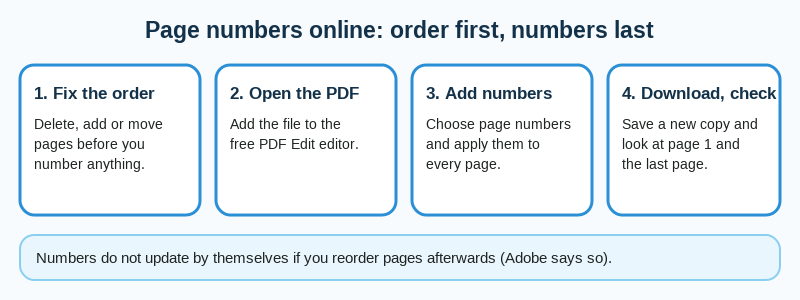
- Finish the pages first: delete, add or move pages before numbering.
- Open the free PDF Edit editor and add your PDF.
- Add page numbers to the pages you want.
- Download the new file, then look at page 1 and the last page.
Why should page numbers be the last thing you add?
Because the numbers are stamped onto the pages and do not follow them. Adobe’s page says that if you change the order or add or remove pages, you will need to renumber the pages for the page numbers to appear correctly.
Here is the catch: a 10-page PDF numbered 1 to 10 and then missing page 4 reads 1, 2, 3, 5. Delete or insert first, number second.
Our guides on deleting pages and adding a page cover the edits that come before.
What choices do online page-number tools give you?
Most let you pick a position, a page range and a text style. iLovePDF adds a margin setting and two modes: Single pages, the default, puts numbers in the same spot on every page, and Facing pages mirrors them for books and brochures.
- Position: a corner or edge, such as bottom center or top right.
- Range: all pages, or only part of the document.
- Style: font, size and colour, on tools that offer it.
Can you skip the cover page when numbering a PDF?
On tools with a page range, yes: start the range at page 2. PDF Candy says its settings can leave out the first or last sheet.
A gap in the sources: none of the pages I read says whether the second page then shows 1 or 2. Check your first numbered page before you send the file.
Can you add page numbers to a PDF on a Mac with Preview?
Not automatically. PDF Candy’s guide says numbering in Preview has to be done by hand with the text tool, page by page, which can leave inconsistent layout. For a long document an online tool saves the typing.
Honestly, learning that Adobe tells you to renumber after any page change made me number last, every time.
Does Adobe’s free page-number tool need a sign-in?
Yes, to save the result. Adobe’s page says to upload, choose placement and range, then sign in, and that without signing in your file is deleted unless you sign in to save it.
The limit is 100MB per file.
If you only need numbers on one file, a no-sign-up editor is faster.
Which way to add page numbers fits you?
Pick by whether you want a sign-in and how long the document is. Checked November 28, 2026.
| Route | What it does | Catch | Source |
|---|---|---|---|
| PDF Edit, browser | Page numbers in the free editor | Add them after page edits | Our editor |
| Adobe online | Placement and page range | Sign-in to save; 100MB limit | Adobe |
| iLovePDF | Single or facing pages, margin, range | Starting number not described | iLovePDF |
| Preview on Mac | Manual text boxes | One page at a time | PDF Candy |
In short: use a number tool for more than a few pages, and always number after the last edit.
Where do the sources differ?
- Sign-in: Adobe requires it to save; other sites we read advertise no sign-up.
- Starting number: iLovePDF’s page describes none; PDF Candy’s roundup says only some tools set the first count.
- Reddit: our search returned no useful Reddit thread for this phrase, so we cite none.
How we researched this
- Read Adobe’s online page-number tool page, iLovePDF’s page-numbers guide and PDF Candy’s no-Acrobat guide, November 28, 2026.
- Read search-result summaries of other online tools.
- Compared four routes by sign-in, options and catches.
- We did not test every site, and we did not test Acrobat ourselves.
Fix the pages, add the numbers, check the first and last page, and enjoy a PDF that counts correctly.
Sources and further reading
Questions and answers
How do I add page numbers to a PDF online?
Open the finished PDF in an online page-number tool, choose the position and page range, apply, then download the new file and check the first and last page.
Can I add page numbers to a PDF online for free?
Yes. The free PDF Edit editor adds page numbers in your browser with no sign-up or watermark.
Do page numbers update if I delete or move a page?
No. Adobe says you must renumber after changing the page order or adding or removing pages, so number the PDF last.
Can I start numbering after the cover page?
On tools with a page range, yes: begin the range at page 2. Check whether your first numbered page shows 1 or 2.
Can Preview on Mac add page numbers?
Not automatically. Per PDF Candy’s guide, Preview needs a text box typed by hand on each page.